Avatar Choices

  • Thread starter Thread starter tripsin
  • Start date Start date
  • Christian Chat is a moderated online Christian community allowing Christians around the world to fellowship with each other in real time chat via webcam, voice, and text, with the Christian Chat app. You can also start or participate in a Bible-based discussion here in the Christian Chat Forums, where members can also share with each other their own videos, pictures, or favorite Christian music.

    If you are a Christian and need encouragement and fellowship, we're here for you! If you are not a Christian but interested in knowing more about Jesus our Lord, you're also welcome! Want to know what the Bible says, and how you can apply it to your life? Join us!

    To make new Christian friends now around the world, click here to join Christian Chat.
T

tripsin

Guest
I am not computer savvy. So I don't have pictures of myself and wouldn't know how to 'apply' them anyway.

Another Christian chat web gives a list of avatars one may select to use. Good idea for CC?
 
That sounds like a good feature, to have your avatar be customisable and have pre-made ones. ;D
 
I am not computer savvy. So I don't have pictures of myself and wouldn't know how to 'apply' them anyway.

Another Christian chat web gives a list of avatars one may select to use. Good idea for CC?

Good thought, but in the meantime:

Top of screen:
Click Forum Actions in the blue menu, then Edit Profile
On the left hand side, select Edit Avatar
You can then paste a url (www.whateveryouwantontheinternet.something) or use browse to get one from your PC

What is a URL?
 
it's the path to the picture

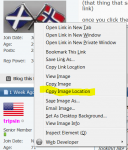
if you click a picture online you can often select "copy image location", what will be copied is something looking like what is in the address bar
(that thing that says christianchat . com + some other stuff (cant write it out or it will just turn into a link)

once you click the copy url, you have it in your "clipboard", when you are on the edit avatar page, simply right- click in the white field and select paste :)
 
it's the path to the picture

if you click a picture online you can often select "copy image location", what will be copied is something looking like what is in the address bar
(that thing that says christianchat . com + some other stuff (cant write it out or it will just turn into a link)

once you click the copy url, you have it in your "clipboard", when you are on the edit avatar page, simply right- click in the white field and select paste :)

I went to a 'free avatars to download' website which had a display of hundreds of avatars. If I enter the url, how odes it know which avatar I want?
 
I like having my own face on my avatar...I don't want some silly cartoon or other pic. I like having my face on it.
 
copyimage.PNG

right click one of the pictures and see if yo get a choice saying to copy the location, the path or the url
 
Selfies! No thanks, I don't want my face all over th internet! I just picked a pic off th web, wrks 4 me :)
 
Loved "once you hit 71 you might not'' like your face all over the internet....;)