
Replying to multiple post.

  • Christian Chat is a moderated online Christian community allowing Christians around the world to fellowship with each other in real time chat via webcam, voice, and text, with the Christian Chat app. You can also start or participate in a Bible-based discussion here in the Christian Chat Forums, where members can also share with each other their own videos, pictures, or favorite Christian music.

    If you are a Christian and need encouragement and fellowship, we're here for you! If you are not a Christian but interested in knowing more about Jesus our Lord, you're also welcome! Want to know what the Bible says, and how you can apply it to your life? Join us!

    To make new Christian friends now around the world, click here to join Christian Chat.

seed_time_harvest

Senior Member
Dec 9, 2011
14,846
2,088
113
How do I reply to someone when I want to use more than three post of other posters when I want to respond?
IE
1.)[QUOTE...]…
2.)[QUOTE...]…
3.)[QUOTE...]…
4.)[QUOTE...]…
And after I have clicked the multiple quote boxes then I reply with quote to number 4.

I have seen other members reply to someone using more than 3 other members post,but I have only been able to do three and no more.

I changed from Enhanced Interface - Full WYSIWYG Editing
To Standard Editor - Extra formatting controls and back and forth but can still only use 3 other members post when I wanted to use 4 posted replys.

Thank you In advance. :)
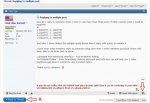
 
MQ.jpg

You're then brought to the "advanced" editor, where each quote should be inserted.
 
Click all the posts with multi quote. For the Last post Don't click multi post, instead click 'reply with quote'. This will quote all you marked. Or should.
 
Click all the posts with multi quote. For the Last post Don't click multi post, instead click 'reply with quote'. This will quote all you marked. Or should.

Last time I checked, the multi-quote has a max of three.
 
How do I reply to someone when I want to use more than three post of other posters when I want to respond?
IE
1.)[QUOTE...]…[QUOTE]
2.)[QUOTE...]…[QUOTE]
3.)[QUOTE...]…[QUOTE]
4.)[QUOTE...]…[QUOTE]

And after I have clicked the multiple quote boxes then I reply with quote to number 4.

I have seen other members reply to someone using more than 3 other members post,but I have only been able to do three and no more.

I changed from Enhanced Interface - Full WYSIWYG Editing
To Standard Editor - Extra formatting controls and back and forth but can still only use 3 other members post when I wanted to use 4 posted replys.

Thank you In advance. :)
What you are going to have to do is:


  1. Do the initial 'Reply With Quote' - with or without clicking any multi-quote buttons. I will call this the "main" edit window.
  2. 'Reply With Quote' on the additional posts you want to quote from - one at a time, opened into a new window or tab - and copy-paste the contents from there into your "main" edit window -- and then - discard the window or tab.

Fair warning ---- any 'Reply With Quote' will also include the posts that are currently "tagged" with multi-quote. To avoid this, you will have to "untag" the multi-quoted posts by clicking the multi-quote button for each of them again.

I highly recommend using the 'Full WYSIWYG Editing' mode.


Last time I checked, the multi-quote has a max of three.
Any chance of this being raised to at least 5?

( Of course, 'unlimited' would be great! :cool: )


:)
 
Fair warning ---- any 'Reply With Quote' will also include the posts that are currently "tagged" with multi-quote. To avoid this, you will have to "untag" the multi-quoted posts by clicking the multi-quote button for each of them again.
Fair warning ---- any and all 'Reply With Quote' operations will also include the posts that are currently "tagged" with multi-quote. To avoid this after the initial 'Reply With Quote' operation, you will have to "untag" the multi-quoted posts ( by clicking the multi-quote button for each of them again ) before doing the additional 'Reply With Quote' operations.

:o
 
What you are going to have to do is:


  1. Do the initial 'Reply With Quote' - with or without clicking any multi-quote buttons. I will call this the "main" edit window.
  2. 'Reply With Quote' on the additional posts you want to quote from - one at a time, opened into a new window or tab - and copy-paste the contents from there into your "main" edit window -- and then - discard the window or tab.

  1. Do the initial 'Reply With Quote' - with or without clicking any multi-quote buttons, opened into a new window or tab. I will call this the "main" edit window.
  2. 'Reply With Quote' on the additional posts you want to quote from - one at a time, opened into a new window or tab - and copy-paste the contents from there into your "main" edit window -- and then - discard the window or tab.

I have a headache today. May I use that as an excuse...? :rolleyes:

"I'm sorry if I have not explained this well enough."

:o
 
Last time I checked, the multi-quote has a max of three.

How do I reply to someone when I want to use more than three post of other posters when I want to respond?
IE
[noparse]1.)[QUOTE...]…
2.)[QUOTE...]…
3.)[QUOTE...]…
4.)[QUOTE...]…
What you are going to have to do is:


  1. Do the initial 'Reply With Quote' - with or without clicking any multi-quote buttons. I will call this the "main" edit window.
  2. 'Reply With Quote' on the additional posts you want to quote from - one at a time, opened into a new window or tab - and copy-paste the contents from there into your "main" edit window -- and then - discard the window or tab.

Fair warning ---- any 'Reply With Quote' will also include the posts that are currently "tagged" with multi-quote. To avoid this, you will have to "untag" the multi-quoted posts by clicking the multi-quote button for each of them again.

I highly recommend using the 'Full WYSIWYG Editing' mode.


Any chance of this being raised to at least 5?

( Of course, 'unlimited' would be great! :cool: )


:)

Fair warning ---- any and all 'Reply With Quote' operations will also include the posts that are currently "tagged" with multi-quote. To avoid this after the initial 'Reply With Quote' operation, you will have to "untag" the multi-quoted posts ( by clicking the multi-quote button for each of them again ) before doing the additional 'Reply With Quote' operations.

:o

I just tried all six above me.
 
Boy, that sure made a mess.
Is this the way you wanted it to look?

Last time I checked, the multi-quote has a max of three.

How do I reply to someone when I want to use more than three post of other posters when I want to respond?
IE
1.)[QUOTE...]…[QUOTE]
2.)[QUOTE...]…[QUOTE]
3.)[QUOTE...]…[QUOTE]
4.)[QUOTE...]…[QUOTE]

And after I have clicked the multiple quote boxes then I reply with quote to number 4.

I have seen other members reply to someone using more than 3 other members post,but I have only been able to do three and no more.

I changed from Enhanced Interface - Full WYSIWYG Editing
To Standard Editor - Extra formatting controls and back and forth but can still only use 3 other members post when I wanted to use 4 posted replys.

Thank you In advance. :)
What you are going to have to do is:


  1. Do the initial 'Reply With Quote' - with or without clicking any multi-quote buttons. I will call this the "main" edit window.
  2. 'Reply With Quote' on the additional posts you want to quote from - one at a time, opened into a new window or tab - and copy-paste the contents from there into your "main" edit window -- and then - discard the window or tab.

Fair warning ---- any 'Reply With Quote' will also include the posts that are currently "tagged" with multi-quote. To avoid this, you will have to "untag" the multi-quoted posts by clicking the multi-quote button for each of them again.

I highly recommend using the 'Full WYSIWYG Editing' mode.


Any chance of this being raised to at least 5?

( Of course, 'unlimited' would be great! :cool: )


:)
Fair warning ---- any and all 'Reply With Quote' operations will also include the posts that are currently "tagged" with multi-quote. To avoid this after the initial 'Reply With Quote' operation, you will have to "untag" the multi-quoted posts ( by clicking the multi-quote button for each of them again ) before doing the additional 'Reply With Quote' operations.

:o
I just tried all six above me.
 
I highly recommend using the 'Full WYSIWYG Editing' mode.
Even though ... sometimes, WYSIWYG ......................... ISN'T. :p

( For those of you who may not know, 'WYSIWYG' stands for 'What You See Is What You Get'. )

:)
 
How do I reply to someone when I want to use more than three post of other posters when I want to respond?
IE
1.)[QUOTE...]…[/QUOTE]
2.)[QUOTE...]…[/QUOTE]
3.)[QUOTE...]…[/QUOTE]
4.)[QUOTE...]…[/QUOTE]
There --- fixed it for you... ;)

:)
 
if you run into a limit on how many you can multiquote at once, you can always duplicate your tab ((i'm working on Chrome - there's a feature to just do that with a right click; dunno about other browsers)) -- and quote the other quotes, then copy-paste into one big reply.

say the forum only lets you multi-quote 4 ((i don't know the actual limit)) but you want to add 6 different posts. open the same thread in two tabs, multiquote 4 in one, and the other 2 in the other tab. cut the 2 quotes from the duplicate reply and paste them into the big reply. then cut & paste to move them all around however you need to.
 
copying a post below that i recently made in another thread to help out a sister, so that if anyone finds this thread by searching, they can make use of what i said, since it includes some screenshots that may be helpful to someone :)


you can multi-quote several posts at the same time. i don't know what the limit is. for simplicity, this is how you would do two of them.

first, on the first post you want to quote, hit this button

152019d1465152592-what-paul-taught-other-than-romans-8-1-lol-capture.jpg


((do this same thing for as many additional posts))

then, on the last post you want to quote, hit this button

152020d1465152639-what-paul-taught-other-than-romans-8-1-lol-capture2.jpg


notice that there's a check mark on the first button -- that's what the additionalposts should have, because you clicked 'multi-quote' on them. it won't make any difference on the last post you quote whether it's checked or not.

lastly, you'll probably want to use the "go advanced" button instead of using "quick reply"

152023d1465152836-what-paul-taught-other-than-romans-8-1-lol-capture3.jpg


this lets you preview what your post will look like, so you can make sure you got the right quotes, and can edit out whichever parts of them you didn't nec. want to reference, etc. from the advanced posting screen, you can use the preview button as many times as you want before submitting the post.

152025d1465152957-what-paul-taught-other-than-romans-8-1-lol-capture4.jpg


plus, the advanced menu lets you do other things like


[TABLE="class: cms_table_grid, width: 300, align: left"]
[TR]
[TD]add[/TD]
[TD]and[/TD]
[/TR]
[TR]
[TD]edit[/TD]
[TD]tables . .[/TD]
[/TR]
[/TABLE]


insert lines . .

indent text ..


and [SUB]other [/SUB]cool [SUP]stuff.[/SUP]


cheers!

:)

 
2.)[QUOTE...]…
3.)[QUOTE...]…[/QUOTE]
4.)[QUOTE...]…[/QUOTE][/noparse]
[/QUOTE]
There --- fixed it for you... ;)

:)[/QUOTE]

And by you fixing It for me, changing what I originally posted,my name Is still there saying I fixed It as If I was the one that fixed It..LOL
 
A trick i learned recently. Find a post by the user you wish to quote. Hit the 'reply with Quote' button and copy this (that will show their name and numbers, but i'm using you as the example).... (no spaces added).

[QU OTE=seed_time_harvest;2624680]

Add in a [/QUOTE] (no spaces) at the end. Then copy the entire thing. Paste it as many times as you intend to quote. So if you wan to quote an individual 6 times, make sure you have 6 copies pasted.

So it should look like this... (without the spaces, i only added them so you could see how it should look)


[QU OTE=seed_time_harvest;2624680] [/QU OTE]

Then simply copy/paste their words between the two like this...
[QU OTE=seed_time_harvest;2624680]I am not really quoting you seed_time_harvest.[/QU OTE]

And without the spaces it looks like this...
I am not really quoting you seed_time_harvest.

It's often a good idea to try the Advanced or Preview buttons to make sure you didn't miss anything.