Show me…
- Thread starter DuchessAimee
- Start date
-
Christian Chat is a moderated online Christian community allowing Christians around the world to fellowship with each other in real time chat via webcam, voice, and text, with the Christian Chat app. You can also start or participate in a Bible-based discussion here in the Christian Chat Forums, where members can also share with each other their own videos, pictures, or favorite Christian music.
If you are a Christian and need encouragement and fellowship, we're here for you! If you are not a Christian but interested in knowing more about Jesus our Lord, you're also welcome! Want to know what the Bible says, and how you can apply it to your life? Join us!
To make new Christian friends now around the world, click here to join Christian Chat.
You are using an out of date browser. It may not display this or other websites correctly.
You should upgrade or use an alternative browser.
You should upgrade or use an alternative browser.




Awesome!











Well now you've done it. You've gone and gotten Pipp started.

Notice I didn't say that was exactly a BAD thing...

I tried twice to download a picture.
Technology and I don't get along.
Technology and I don't get along.
Yeah, um... About that...I tried twice to download a picture.
Technology and I don't get along.
For some reason Firefox, on a smartphone, doesn't post pictures. You have to use chrome.
If you're on a laptop and chrome is not posting pictures... Try firefox? Or maybe Internet Explorer?
G
Gojira
Guest
Grand Central Station, flowers, Chrysler Building lobby, Rascal (my friend's late dog), and goth noir me.
Attachments
-
 3D855FAD-1DAE-4C3B-A5E4-CE7BF08EBBB3_1_105_c.jpeg89.4 KB · Views: 4
 -
 09E1137C-5368-4FD0-82DC-BEA1993AC5E7_1_105_c.jpeg82.3 KB · Views: 3
 -
 30EDDDFB-7D00-4F40-9791-2B36ADC42512_1_105_c.jpeg69.5 KB · Views: 2
 -
 56F187FF-017D-4506-B18E-E2302AD75ACC_1_105_c.jpeg76.5 KB · Views: 4
 -
 924CEAD0-A8BF-4031-B411-FD7259FDEE65_1_105_c.jpeg110.3 KB · Views: 4
 -
 6479CA1C-EE50-4673-A1BA-4EE94BDEFA3F_1_105_c.jpeg380.2 KB · Views: 5

It's actually an uploadI tried twice to download a picture.
Technology and I don't get along.
 Are you on a phone?




G
Gojira
Guest
Impressive. Indeed you ahh powerful as the emperor has fawseen .

I tried twice to download a picture.
Technology and I don't get along.
Come on Krumbeard, you can do it....With Magenta's help. lol
It's actually an upload
Magenta, what's the photo program you recommend that resizes image, so it's less data?
I have mountain pictures to post, but CC data limits are preventing this.
If you are sharing an image from online, you can upload to https://postimages.org/ and chooseCome on Krumbeard, you can do it....With Magenta's help. lol
Magenta, what's the photo program you recommend that resizes image, so it's less data?
I have mountain pictures to post, but CC data limits are preventing this.
to resize on upload. If the file does not allow it, save to your computer first and then upload to
https://postimages.org/ and select from the drop-down. 640 pixels is often large enough

It is the same straight from your e-device. I like postimages for a number of reasons,
such as, they do not require registration, they do not limit viewing of your images due to
band width usage, nor do they delete images (as photobucket does or used to on all three
counts), although postimages gives you the option to delete as long as you save the link to
do so, or do it before closing the upload page where all the coding info is given
Select the direct link from the second line of links provided, to copy and paste into the appropriate image tags.
Something else to keep in mind is that quoted messages do not carry over images posted
from member devices. A numbered link is provided instead which has to be clicked in order
to see the image. If you wish your image to transfer, or are wanting to post an image in a PM,
use an image host such as postimages.org. If you are quoting someone's post from an earlier
page and want their image to display, quote their post and then preview it with the number code,
open the image from the original post by right clicking to view, copy the christianchat url, and
insert in place of the number code. You must also change [ ATTACH] TO [ IMG] AND [ /ATTCH] TO [ /IMG]

Newer devices may not require this work-around to display images uploaded directly from other member devices.
I save my image file urls in a document for such, so that if I want to post the
same image again, I simply search the document for it by name, or keyword
in the verse.I am trying to get more thoroughly organized in this LOL.
If you are sharing an image from online, you can upload to https://postimages.org/ and choose
to resize on upload. If the file does not allow it, save to your computer first and then upload to
https://postimages.org/ and select from the drop-down. 640 pixels is often large enough
It is the same straight from your e-device. I like postimages for a number of reasons,
such as, they do not require registration, they do not limit viewing of your images due to
band width usage, nor do they delete images (as photobucket does or used to on all three
counts), although postimages gives you the option to delete as long as you save the link to
do so, or do it before closing the upload page where all the coding info is given
Select the direct link from the second line of links provided, to copy and paste into the appropriate image tags.
Something else to keep in mind is that quoted messages do not carry over images posted
from member devices. A numbered link is provided instead which has to be clicked in order
to see the image. If you wish your image to transfer, or are wanting to post an image in a PM,
use an image host such as postimages.org. If you are quoting someone's post from an earlier
page and want their image to display, quote their post and then preview it with the number code,
open the image from the original post by right clicking to view, copy the christianchat url, and
insert in place of the number code. You must also change [ ATTACH] TO [ IMG] AND [ /ATTCH] TO [ /IMG]
Newer devices may not require this work-around to display images uploaded directly from other member devices.
I save my image file urls in a document for such, so that if I want to post the
same image again, I simply search the document for it by name, or keyword
in the verse.I am trying to get more thoroughly organized in this LOL.
Thanks for your help, that was a lot of work for posting pics. lol
I have better ones, but 3 is enough.
I didn't change the file name at all, so my computer must know things.



These pictures are internationally copyrighted. Any copy/reproduction of them will require authorization from photographer and a large sum of cash. The full extent of the law can and will be used against violations of this made up of copyright protection. Did I make myself clear?
Most windows' based computers come with Paint, which can be used to resize image filesThanks for your help, that was a lot of work for posting pics. lol
I have better ones, but 3 is enough.
I didn't change the file name at all, so my computer must know things.
View attachment 245255View attachment 245256
View attachment 245257
These pictures are internationally copyrighted. Any copy/reproduction of them will require authorization from photographer and a large sum
of cash. The full extent of the law can and will be used against violations of this made up of copyright protection. Did I make myself clear?
Paint is pretty much useless to me, though
“Come now, let’s settle this,” says the LORD. “Though your sins are like scarlet, I will make them as white as snow. Though they are red like crimson, I will make them as white as wool.” - Isaiah 1:18 NLT
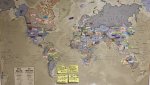
And yes, that’s a world map with sticky notes of declaration be upon those who does missionary who God sent to share the good news

Happy Weekend everyone
And yes, that’s a world map with sticky notes of declaration be upon those who does missionary who God sent to share the good news
Happy Weekend everyone