I'm not a stupid person, but

  • Christian Chat is a moderated online Christian community allowing Christians around the world to fellowship with each other in real time chat via webcam, voice, and text, with the Christian Chat app. You can also start or participate in a Bible-based discussion here in the Christian Chat Forums, where members can also share with each other their own videos, pictures, or favorite Christian music.

    If you are a Christian and need encouragement and fellowship, we're here for you! If you are not a Christian but interested in knowing more about Jesus our Lord, you're also welcome! Want to know what the Bible says, and how you can apply it to your life? Join us!

    To make new Christian friends now around the world, click here to join Christian Chat.

jamie26301

Senior Member
May 14, 2011
1,156
10
38
41
here's a stupid question.

I'm confused as to how to insert pictures into a thread post. I'll have the url that shows up for just that pic being in my browser, but I don't see the actual picture show up... or does it not until you have posted the post?
 
That's probably what was throwing me off - probably doing it right, just didn't know I had to post first.
 
here's a stupid question.

I'm confused as to how to insert pictures into a thread post. I'll have the url that shows up for just that pic being in my browser, but I don't see the actual picture show up... or does it not until you have posted the post?

if you write something in the post BEFORE you insert the pic, it will show up..if you DON'T write anything first, it will show up as blank until you hit the "post quick reply" button. :)
 
Ah! Thanks so much Lady! Cos yeah, I didn't it wrong, I guess...

*goes off to fix it*
 
Do you mean if you click on the picture after you post it? Because the pics in threads are not meant to be clicked on to begin with.
 
You can also click 'Go advanced' on a post you're writing to see if the pic will show or not, it's like a Preview button.
 
Ok, i see what you did wrong. You can't simply paste the location of your hard drive in a post and expect it to work.You have to click 'Insert Image' (third icon from the right at the top of the box) and upload the picture from your computer.
 
On my computer. I mean when I paste it over on the uploader, and navigates (leaves) the CC forum and opens to a browser form of the picture, using the PC's address for it.
 
I suppose there may be a limit as to how large your pictures can be, my largest 10.7 MB was tagged with an exclamation point that said "undefined" but my next highest at 6.88 MB uploaded fine, along with the others that were large files. Hmm, wait a minute they've been automatically scaled down, perhaps that first was unable to be scaled down enough relating in an undefined error, I don't know if you had a file as large or larger than 6.88 MB but a scaling down should do the trick.
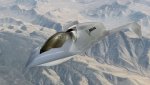
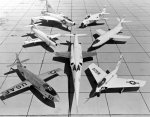
aircraft_nasa_prototypes_desktop_2589x3000_hd-wallpaper-723131.jpgsoar-unmanned-space-plane-2.jpgnasa_hwb_full.jpgHelios_in_flight.jpgX-planes_group_photo.jpganimated_nasa_meatball.gif
 
Last edited:
here's a stupid question.

I'm confused as to how to insert pictures into a thread post. I'll have the url that shows up for just that pic being in my browser, but I don't see the actual picture show up... or does it not until you have posted the post?

If I'm understanding you correctly, then this depends on which editor you are using. CC has three different editors:

The Standard and Basic editors will not display your image in the reply box that you're composing your message in. Instead, they will display your image's link/URL, or if you're uploading an image from your computer, it will show . You can only see the image if you preview your post or if you post it.

The WYSIWYG editor should display images you link on the fly. I don't know about images you upload/attach, however; these may only be displayed in a preview or after you post, even with this editor.

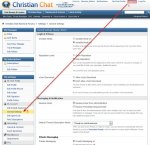
Here is how you can make changes to which editor you are using when you post on the forums here:

editors.jpg

editors cont.jpg
 
Last edited: