

I was reading an email on an outlook.com account when suddenly the size of the email display went GIANT on me.
I tried going in setting to change things and see if I could figure this out but then realized that everything is normal.
The only thing not normal is the display size when I open the emails. They display giant (while my lists and things on the side continue to show normal size) This is driving me batty and I don't know what happened and can't figure out how to get it back to normal.
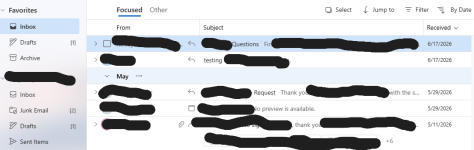 So, my list on the side bar is normal sizing, and my list of messages is normal sizing, BUT when I open a message it is much larger:
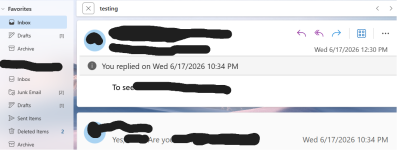 and I can't figure out how it happened or where in my settings to get it back to normal. (And I know the sizes of the images are going to make it look different that what I actually see, but hope it helps make this question make sense).
Everything is normal except the size of the messages once opened.
Anyone know how I can get it back to the size I had it / want it?
 When this happened, my hand was resting near the bottom of the keyboard by SHIFT; CTRL; FN; Windows key; ALT; & Z but I don't think I hit anything. And I was trying to scroll with the laptop mousepad on an open message.
Thanks!
I tried going in setting to change things and see if I could figure this out but then realized that everything is normal.
The only thing not normal is the display size when I open the emails. They display giant (while my lists and things on the side continue to show normal size) This is driving me batty and I don't know what happened and can't figure out how to get it back to normal.
So, my list on the side bar is normal sizing, and my list of messages is normal sizing, BUT when I open a message it is much larger: and I can't figure out how it happened or where in my settings to get it back to normal. (And I know the sizes of the images are going to make it look different that what I actually see, but hope it helps make this question make sense). Everything is normal except the size of the messages once opened.
Anyone know how I can get it back to the size I had it / want it?
When this happened, my hand was resting near the bottom of the keyboard by SHIFT; CTRL; FN; Windows key; ALT; & Z but I don't think I hit anything. And I was trying to scroll with the laptop mousepad on an open message. Thanks!


