Emails from this forum

  • Thread starter Thread starter Chuckt
  • Start date Start date
  • Christian Chat is a moderated online Christian community allowing Christians around the world to fellowship with each other in real time chat via webcam, voice, and text, with the Christian Chat app. You can also start or participate in a Bible-based discussion here in the Christian Chat Forums, where members can also share with each other their own videos, pictures, or favorite Christian music.

    If you are a Christian and need encouragement and fellowship, we're here for you! If you are not a Christian but interested in knowing more about Jesus our Lord, you're also welcome! Want to know what the Bible says, and how you can apply it to your life? Join us!

    To make new Christian friends now around the world, click here to join Christian Chat.
C

Chuckt

Guest
I'm getting around 90 emails about responses to my messages in the forum a day. They are crowding up my inbox and they don't really show everyone who responded to me and when I click the link, they don't always go directly to the message that was posted.

I would like to get it to stop. I tried to unsubscribe unsuccessfully.
 
It's in the <SETTINGS>. Go turn off "notifications".... or something like that. If I figured it out, you will be able to.
 
When I go to settings and notifications, it only says "Inbox".
There are no other controls and my email is getting flooded by everyone who posts here.
 
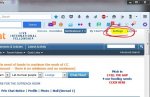
Go to 'Settings' in the top right.
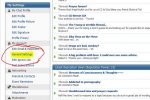
On the left side you will see 'General Settings'.
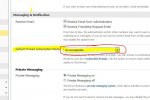
On that page are numerous options. One is 'Default thread subscription mode'.
Set it to 'Do not subscribe'.
Then scroll down to the bottom of the page and click save.
 
@Ulgy, i love your avatar! :D though i know it has nothing to do with Chuck's problem!
 
Click on "Settings" in the upper right corner of the main screen

Capture01.JPG

The click on "General Settings" on the left column

Capture02.jpg

Then scroll down to "Messaging and Notification" and change the thread subscription mode to "do not subscribe"

Capture03.JPG

Then scroll to the bottom of the page and click "Save Changes"


I'm still having the same issue. I set it to "Do not subscribe" yesterday and yet I'm still receiving emails. Yes I pushed saved. I just checked it again and is says it's on "Do not subscribe".
 
I'm still having the same issue. I set it to "Do not subscribe" yesterday and yet I'm still receiving emails. Yes I pushed saved. I just checked it again and is says it's on "Do not subscribe".

If you haven't cleared prior subscriptions you will continue to get notification for those.

Go into "settings" and you can edit your subscriptions by clicking on the "subscriptions" button under the My Subscriptions header on the left.

Once you clear off any pre-existing subscriptions the notifications should stop.
 
If you haven't cleared prior subscriptions you will continue to get notification for those.

Go into "settings" and you can edit your subscriptions by clicking on the "subscriptions" button under the My Subscriptions header on the left.

Once you clear off any pre-existing subscriptions the notifications should stop.

I did clear it out, I guess I had some more before I unsubscribed. Thank you!!
 
If you haven't cleared prior subscriptions you will continue to get notification for those.

Go into "settings" and you can edit your subscriptions by clicking on the "subscriptions" button under the My Subscriptions header on the left.

Once you clear off any pre-existing subscriptions the notifications should stop.


Thank you, Oncefallen, for being such a good "informer".. :)