Uploading Jpegs
- Thread starter RickyZ
- Start date
-
Christian Chat is a moderated online Christian community allowing Christians around the world to fellowship with each other in real time chat via webcam, voice, and text, with the Christian Chat app. You can also start or participate in a Bible-based discussion here in the Christian Chat Forums, where members can also share with each other their own videos, pictures, or favorite Christian music.
If you are a Christian and need encouragement and fellowship, we're here for you! If you are not a Christian but interested in knowing more about Jesus our Lord, you're also welcome! Want to know what the Bible says, and how you can apply it to your life? Join us!
To make new Christian friends now around the world, click here to join Christian Chat.
You are using an out of date browser. It may not display this or other websites correctly.
You should upgrade or use an alternative browser.
You should upgrade or use an alternative browser.

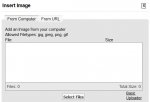
More often than not, when I try to upload a jpeg the dialog box just stares at me and doesn't respond.
Any ideas why?
Try saving it as a .jpg instead.. Mine are all (mostly) jpg's and they upload just fine.


There may be a size issue at play here. I find too large in terms of megapixels just won't load.It is actually saved as a .jpg. Tried half a dozen times this morning, it just wouldn't upload. Tried it again right now and it uploaded instantly. Seems to be the pattern here. More times than not.

G
GaryA
Guest


Ricky,
Please tell us *exactly* ( step-by-step ) how you are trying to do this...?
I click the insert image icon, then basic uploader, browse for the file, select the file, then upload file. Sometimes it uploads, other times we just stare at each other.
And typically my system sleeps instead of hibernating
And, win 7. what did I 'win'?
G
GaryA
Guest
'basic uploader' is an option? What other option(s) are available with that? 'advanced uploader'?I click the insert image icon, then basic uploader, browse for the file, select the file, then upload file. Sometimes it uploads, other times we just stare at each other.
And typically my system sleeps instead of hibernating
And, win 7. what did I 'win'?


All I see are the two tabs 'From Computer' and 'From URL'.
Perhaps, try changing the 'Enhanced Attachment Uploading' option ( in user settings ) to the opposite from what it is now.
"Don't know what else to tell you, Ricky..."

~
Perhaps it should be called "lose 13"...???
hahahahahahahaha
( better to have windows 7 than windows 10 )
Last edited:
U