
IS there a way to post pictures
- Thread starter KALYNA18
- Start date
-
Christian Chat is a moderated online Christian community allowing Christians around the world to fellowship with each other in real time chat via webcam, voice, and text, with the Christian Chat app. You can also start or participate in a Bible-based discussion here in the Christian Chat Forums, where members can also share with each other their own videos, pictures, or favorite Christian music.
If you are a Christian and need encouragement and fellowship, we're here for you! If you are not a Christian but interested in knowing more about Jesus our Lord, you're also welcome! Want to know what the Bible says, and how you can apply it to your life? Join us!
To make new Christian friends now around the world, click here to join Christian Chat.
You are using an out of date browser. It may not display this or other websites correctly.
You should upgrade or use an alternative browser.
You should upgrade or use an alternative browser.


ANSWER: UNCLICK retrieve remote file
I have searched high & low for this. It sure is not in GENERAL SETTINGS.... where is it to be found.

I have searched high & low for this. It sure is not in GENERAL SETTINGS.... where is it to be found.
go to the insert picture box above (to the left of the insert film icon)
click it
you'll see:
Insert Image
Add an Image from Url
URL << paste in your pic url here
Retrieve remote file and reference locally < unclick the checked box.
go to the insert picture box above (to the left of the insert film icon)
click it
you'll see:
Insert Image
Add an Image from Url
URL << paste in your pic url here
Retrieve remote file and reference locally < unclick the checked box.
Nope. Not there. The only thing there is one single box for a URL........ then at the bottom is "OK" or "CANCEL".

When you click on the inset image box (circled in red)
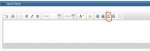
this is the window you should be seeing (the box Zone was talking about is circled in red
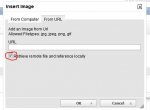
this is the window you should be seeing (the box Zone was talking about is circled in red
When you click on the inset image box (circled in red)
View attachment 162488
this is the window you should be seeing (the box Zone was talking about is circled in red
View attachment 162489
Mine looks exactly like that, EXCEPT that there is nothing, nada, not a thing below the URL box.
Several months ago, it allowed me to select from my local hard drive.... as well as from a URL. Then one day the "local" option disappeared, and has never been seen again.
bummer.....
Yep. But, I'm getting used to it. I can't set a default font size either.... nor have enough time to effectively edit any errors my posts might have. So, I guess it is always going to be what it is.
Mine looks exactly like that, EXCEPT that there is nothing, nada, not a thing below the URL box.
Several months ago, it allowed me to select from my local hard drive.... as well as from a URL. Then one day the "local" option disappeared, and has never been seen again.
Has anything else changed such as what browser, or device you are using?
F
FreeNChrist
Guest
Mine looks exactly like that, EXCEPT that there is nothing, nada, not a thing below the URL box.
Several months ago, it allowed me to select from my local hard drive.... as well as from a URL. Then one day the "local" option disappeared, and has never been seen again.
Same here.
Has anything else changed such as what browser, or device you are using?
Not a thing. Just one day I went to post a picture from my computer, and there were no more "tabs" to select from. From that day till now, all I can do is post online pictures through their URL.......... Or post videos the same way.
C
CharlieGrown
Guest
Not a thing. Just one day I went to post a picture from my computer, and there were no more "tabs" to select from. From that day till now, all I can do is post online pictures through their URL.......... Or post videos the same way.
same here, has been an issue for a few months for me. What's weird is there is a thread created by RobCop that the browse local option is available...
same here, has been an issue for a few months for me. What's weird is there is a thread created by RobCop that the browse local option is available...
Maybe we need to purchase that option?
G
GaryA
Guest
So -- you are saying that the 'From Computer' tab is missing?Not a thing. Just one day I went to post a picture from my computer, and there were no more "tabs" to select from. From that day till now, all I can do is post online pictures through their URL.......... Or post videos the same way.
So -- you are saying that the 'From Computer' tab is missing?
That's exactly what I am saying...... In fact, BOTH tabs are missing. All I have is one single "URL" box to type into.
G
GaryA
Guest
In your general settings, what 'Message Editor Interface' option are you using?
i.e. - 'Enhanced Interface - Full WYSIWYG Editing', for example
EDIT: Not that it will necessarily matter in the slightest, but...

i.e. - 'Enhanced Interface - Full WYSIWYG Editing', for example
EDIT: Not that it will necessarily matter in the slightest, but...
Last edited:

idk. But I know who I believed in, and am persuaded that he is able.Nope. Not there. The only thing there is one single box for a URL........ then at the bottom is "OK" or "CANCEL".
ask this duck, he looks pretty confidant, confident. ducky not dumby.Does NOTHING here. Could you explain, step-by-step, exactly how you do this?..... (leaving NOTHING out of your process?)
idk but sounds complex. I like life that is simple not complicated. url ur in trouble lolIn your general settings, what 'Message Editor Interface' option are you using?
i.e. - 'Enhanced Interface - Full WYSIWYG Editing', for example
EDIT: Not that it will necessarily matter in the slightest, but...