Hi I'm just registered today. But??????????????????

  • Christian Chat is a moderated online Christian community allowing Christians around the world to fellowship with each other in real time chat via webcam, voice, and text, with the Christian Chat app. You can also start or participate in a Bible-based discussion here in the Christian Chat Forums, where members can also share with each other their own videos, pictures, or favorite Christian music.

    If you are a Christian and need encouragement and fellowship, we're here for you! If you are not a Christian but interested in knowing more about Jesus our Lord, you're also welcome! Want to know what the Bible says, and how you can apply it to your life? Join us!

    To make new Christian friends now around the world, click here to join Christian Chat.

OnlyForToday

Junior Member
Apr 12, 2014
3
0
1
What on earth is up with the random videos of people on my screen? I chose the option of NOT using webcam, yet I'm getting other chatters popping up on my screen? Is there a way of not listening to people convo?
 
Welcome to Christian Chat.

You have the option not to use your webcam, but you will still see others webcams, however you can choose "Mute all speaking" when going into chat, or there is a volume button above where you type in the chatroom.

God Bless You


I think after so long they give you the Mute all speaking, because I have that option, but you can use the volume button you won't hear the conversations. Even with the Mute all speaking option you still see the webcams of other people, just not hear them.


If I thought the shades would stop strangers from popping up in the middle of my screen I would use them. It very intrusive and disruptive.
 
Unfortunately you have new users giving you advice that still don't know the right answers.

There IS a way to turn off other peoples cams as well..

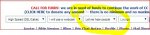
Next to the blue 'Chat now!' button you have 4 options. The farthest on the left is the High Speed/Low Speed option. Setting the option to 'Low Speed' turns off other peoples cams.
To the right of that 'I Will/Won't Use A Webcam' turns your own webcam on/off.
To the right again is 'Let Me Hear People/Mute All Speaking' which turns the sounds off of people who use mic/cam.
So you can select 'Low Speed' and 'Let Me Hear People' if you want to hear, but not see them.

The one catch is that turning off their cams does not stop the little speech box from popping up anytime someone uses their cam/mic. Instead it will only show their avatar and name. But if this is a problem still all you have to do is left click on the box, hold it down and drag it where you want it. Since i typically don't have sound on, and therefore don't have any use to know who is talking i will click the top left corner of the box and drag it to the far right of the screen until most of it is hidden. This way it keeps it off the chat screen so you can read easier.

For more help on the site click this link ~~> http://christianchat.com/new-christ...-yourselves/80141-updated-help-new-users.html
Reading post number 2 in the link gives you the visual example of the options i just explained.
 
Last edited by a moderator:
Only for Today - welcome to the forums!!

Ugly - I've been here a year and I did not know all that either. That may come from being on the boards mostly and participating in chat for only a month or so. Thanks for the info!
 
Only for Today - welcome to the forums!!

Ugly - I've been here a year and I did not know all that either. That may come from being on the boards mostly and participating in chat for only a month or so. Thanks for the info!

Yeah, but you weren't giving answers either ( ;
 
There is an option to mute all speaking - also if you don't like the images popping up you can click on the image and drag it to hide it along the side panel. Thats what I do.

mute.JPG

I didnt see the option to mute all speaking.. Just the volume button.. Is that what your referring to?