How do (electronic) tablets work?

  • Thread starter Thread starter Depleted
  • Start date Start date
  • Christian Chat is a moderated online Christian community allowing Christians around the world to fellowship with each other in real time chat via webcam, voice, and text, with the Christian Chat app. You can also start or participate in a Bible-based discussion here in the Christian Chat Forums, where members can also share with each other their own videos, pictures, or favorite Christian music.

    If you are a Christian and need encouragement and fellowship, we're here for you! If you are not a Christian but interested in knowing more about Jesus our Lord, you're also welcome! Want to know what the Bible says, and how you can apply it to your life? Join us!

    To make new Christian friends now around the world, click here to join Christian Chat.
D

Depleted

Guest
Sorry again. I'm 20th century still, so don't get how 21st century stuff works. If I bought an Android tablet for someone else, and where he lives is a free WiFi hotspot, does he still need a monthly subscription/rental/service/whatever that's called to Android? (Please tell me Android is a service too, because I'm thinking it is. lol)
 
Android is the name of the operating system on the tablet.

To use the Play Store (Android's version of Apple's iTunes), all he will need is a Google GMail address, which he will be prompted to input if he has one or if he doesn't he can set one up when he starts up the tablet. There's no fees associated unless he wants to buy an application or game from the store, but there are TONS of free ones.

My Dad is 74 and many years off the technology train, and he set his own tablet up in 10 minutes. It's easy.
 
No you won't need any monthly subscription or anything. It will most likely just ask you to make a new email account (free). You don't have to make one if you don't want to.

I recommend letting someone who knows more about tablets set it up for you because it will try to get you to sign up for stuff as you go through the setup process and sometimes they make it hard to figure out how to skip over that stuff.
 
Android is the name of the operating system on the tablet.

To use the Play Store (Android's version of Apple's iTunes), all he will need is a Google GMail address, which he will be prompted to input if he has one or if he doesn't he can set one up when he starts up the tablet. There's no fees associated unless he wants to buy an application or game from the store, but there are TONS of free ones.

My Dad is 74 and many years off the technology train, and he set his own tablet up in 10 minutes. It's easy.
20th century. I've heard of Play Store and iTunes, but have no idea what that means. It's that something like a homepage on IE?

And, cool! A gmail address. I've been trying to talk him into gmail for years. lol
 
No you won't need any monthly subscription or anything. It will most likely just ask you to make a new email account (free). You don't have to make one if you don't want to.

I recommend letting someone who knows more about tablets set it up for you because it will try to get you to sign up for stuff as you go through the setup process and sometimes they make it hard to figure out how to skip over that stuff.
Could someone who was a computer tech in the beginning of this century (when "ghosting," "servers," and "admin rights" were everyday words), do it? I'm still 20th century. He slipped a little into the 21st century before disabilities left him behind.
 
No he doesn't, or at least he shouldn't. He may need the password for that spot if it's protected. Obviously he can get that from whomever owns the spot.

Does your person like to draw? Because if so I have an awesome cheat. If they have it on android, there is a photoshop application called Photoshop Sketch I think? Or Photoshop touch. Basically it's $5, and you can use the photoshop program for drawing, photography editing, ect. And you can get little styluses, basically pens that you use for your tablet, for like maybe $10. So with that you get the ability to make art that would usually on a desktop cost like $300+ to make. It's awesome., and I use it all the time.
 
No he doesn't, or at least he shouldn't. He may need the password for that spot if it's protected. Obviously he can get that from whomever owns the spot.

Does your person like to draw? Because if so I have an awesome cheat. If they have it on android, there is a photoshop application called Photoshop Sketch I think? Or Photoshop touch. Basically it's $5, and you can use the photoshop program for drawing, photography editing, ect. And you can get little styluses, basically pens that you use for your tablet, for like maybe $10. So with that you get the ability to make art that would usually on a desktop cost like $300+ to make. It's awesome., and I use it all the time.
He's hubby. And nope, doesn't like to draw or write.
crazy-smiley-emoticon.gif
(lol It's okay, we both know the other one is a bit nuts for our choices in fun things to do.)

But part of the reason I'd like to get him one of these things is because he hasn't been on a computer in 5 months! Can you even imagine? 5 months!!! He likes music, and he likes searching news stories, so I figure it gives him something to do until he can get up and go to the rehab's computers.

That and he needs to exercise his hands, so playing with the buttons works.

FIVE months!
fainting-smiley-emoticon.gif
 
But part of the reason I'd like to get him one of these things is because he hasn't been on a computer in 5 months! Can you even imagine? 5 months!!!
Yes. It sounds a bit sublime.

A tablet sounds like a good option for him. They're fast and generally reliable without being terribly expensive. Avoid the off-name brands that you might see on HSN, though. Stick with names like Asus/Nexus, Samsung, or even a Microsoft Surface tablet (keep in mind that the Microsoft tablets use a mobile version of Windows 10, not Android).
 
Yes. It sounds a bit sublime.

A tablet sounds like a good option for him. They're fast and generally reliable without being terribly expensive. Avoid the off-name brands that you might see on HSN, though. Stick with names like Asus/Nexus, Samsung, or even a Microsoft Surface tablet (keep in mind that the Microsoft tablets use a mobile version of Windows 10, not Android).
I immediately thought, "Ooo! Microsoft Windows! He knows that. I'll get him that!"

So I googled. Dang twice as much as the off-named brand. I'll have to work on looking at Nexus or Samsung to see if I can find a cheaper one. But, thanks. At least I'm finally to the point of knowing what to search for. It's hard to find something if you don't even know what they're called. lol
 
Hi depleted,

I assume you use a PC?

Just to give you an idea of what you can do with a tablet, I have an iPad and a Mac laptop.

I use the iPad so much now that I only get out my Mac when I want to type up a letter
or print something off or go into chat on here. (There isn't adobe flash player for an iPad)

I use the iPad on here in the forums, email friends, do my grocery shopping on line.
I have a bible app on the iPad with 5 different versions of the bible, I have a
kindle app downloaded with numerous books, it has all my music on it, plus drawing
apps, games and loads more stuff. I even take it to church meetings and link it up
to a speaker via blue tooth to provide a bit of worship music. Plus you can access YouTube.
Plus I can slip it into my hand bag.


If you get a tablet it may be better to set it up in your house first so you can link it
to your own wifi and down load whatever you need to on it. There will be setting options
for linking it to your wifi. If John has his own email address already, you don't need to set
up a new one, just input his original email address.

Once it is all set up, all you have to do is then take it to the rehab place and select their
wifi instead of your own, as someone has said you may need to find out their password or
go through a registration process, but it's really simple and usually when you select
the rehab place wifi, there are instructions which will tell you what to do.

Oh one other thing, it will be more expensive but if you can afford it, then it's worth picking
a tablet that is capable of both wifi and cellular data. That way it can be used anywhere even
if there is no wifi.

It just means getting a SIM card just as you would for a phone.

My iPad has both options. Occasionally when I need to use the SIM card data option, I just
buy a one off day, or week data package using my bank card, so there is no need to take
out a contract. Mostly I just use wifi though, but it's useful to have the cellular data
option as well.

 
Hi depleted,

I assume you use a PC?

Just to give you an idea of what you can do with a tablet, I have an iPad and a Mac laptop.

I use the iPad so much now that I only get out my Mac when I want to type up a letter
or print something off or go into chat on here. (There isn't adobe flash player for an iPad)

I use the iPad on here in the forums, email friends, do my grocery shopping on line.
I have a bible app on the iPad with 5 different versions of the bible, I have a
kindle app downloaded with numerous books, it has all my music on it, plus drawing
apps, games and loads more stuff. I even take it to church meetings and link it up
to a speaker via blue tooth to provide a bit of worship music. Plus you can access YouTube.
Plus I can slip it into my hand bag.


If you get a tablet it may be better to set it up in your house first so you can link it
to your own wifi and down load whatever you need to on it. There will be setting options
for linking it to your wifi. If John has his own email address already, you don't need to set
up a new one, just input his original email address.

Once it is all set up, all you have to do is then take it to the rehab place and select their
wifi instead of your own, as someone has said you may need to find out their password or
go through a registration process, but it's really simple and usually when you select
the rehab place wifi, there are instructions which will tell you what to do.

Oh one other thing, it will be more expensive but if you can afford it, then it's worth picking
a tablet that is capable of both wifi and cellular data. That way it can be used anywhere even
if there is no wifi.

It just means getting a SIM card just as you would for a phone.

My iPad has both options. Occasionally when I need to use the SIM card data option, I just
buy a one off day, or week data package using my bank card, so there is no need to take
out a contract. Mostly I just use wifi though, but it's useful to have the cellular data
option as well.
Miri,
You're assuming too much. My phone doesn't have a SIM, or, if it does, I don't know where it is. I have a cellphone, only because John worried about me getting lost or the car breaking down (again.) In the last five months, I have gone through all this without ever using that phone. I particularly did not want to use that phone the first few nights when I feared someone would call me in the middle of the night to tell me he died or to rush me to the hospital because he was about to die. In my mind, there is absolutely no situation anymore that is such an emergency that I "need" a phone on me at all moments.

I have a phone for John's peace of mind, not to use. And, he wrote down instructions on how to use it, which I keep with the phone, because that's the only way I can use it. That's how bad I am at modern technology. So I'm no better with a phone than I am with tablets. (And every time I write the word tablet, I'm still stuck thinking it means "pill" or "something to write the Ten Commandments on." lol)
 
But I have been researching this more, and I don't feel much closer to unlost. I now know he needs one with a keyboard "docked" to it. A mouse would be nice, because those little finger scrolling pads used, instead of mouses, have always driven us up a wall to the point we carried a mouse around for laptops even. And enough whatever-kind-of-memory is needed (is that RAM, Hertz, ROM, or whatever, because I don't know) to include music, photos, videos, and mostly eSword. He really wants eSword, and I have no idea if I get him a Samsung does that mean he can download eSword? I don't know if the name of the manufacturer denoted the OS or even how I figure out what OS is used. (Last I knew, there were two OS's -- Windows and Mac, so I'm totally lost that Android is apparently an OS now. lol)

John knows this stuff. I don't. But he can't get to a computer to figure all this out. But he really really wants eSword. I really want him to go online so he knows what's on TV tonight, because I look, and then forget what I discovered. I'd like to show him my new chair before he gets home, so I'd like to take in pictures on the camera card, (is that a SIMs card? IDK this stuff), or, if he had this gadget, I could just email it to him. And I'd like to show him the living room and the garden, just so he is sure what he is remembering now is the reality. (Delirium is so real when it happens, he's now stuck with some odd memories, which means he's not quite sure which memories are real.)

But first things first, I have to know if all this is in or out of our price range. Because, honestly, if we could afford a new computer, it means we could also afford him having three days in a great rehab. If we could afford the monthly service fees, we could afford another 1-2 more days in a good rehab.

I just negotiated a price for something we can afford because we saved for it -- teeth for him! But he really wants eSword too.
confusion-smiley-emoticon.gif
 
But I have been researching this more, and I don't feel much closer to unlost. I now know he needs one with a keyboard "docked" to it. A mouse would be nice, because those little finger scrolling pads used, instead of mouses, have always driven us up a wall to the point we carried a mouse around for laptops even. And enough whatever-kind-of-memory is needed (is that RAM, Hertz, ROM, or whatever, because I don't know) to include music, photos, videos, and mostly eSword. He really wants eSword, and I have no idea if I get him a Samsung does that mean he can download eSword? I don't know if the name of the manufacturer denoted the OS or even how I figure out what OS is used. (Last I knew, there were two OS's -- Windows and Mac, so I'm totally lost that Android is apparently an OS now. lol)

John knows this stuff. I don't. But he can't get to a computer to figure all this out. But he really really wants eSword. I really want him to go online so he knows what's on TV tonight, because I look, and then forget what I discovered. I'd like to show him my new chair before he gets home, so I'd like to take in pictures on the camera card, (is that a SIMs card? IDK this stuff), or, if he had this gadget, I could just email it to him. And I'd like to show him the living room and the garden, just so he is sure what he is remembering now is the reality. (Delirium is so real when it happens, he's now stuck with some odd memories, which means he's not quite sure which memories are real.)

But first things first, I have to know if all this is in or out of our price range. Because, honestly, if we could afford a new computer, it means we could also afford him having three days in a great rehab. If we could afford the monthly service fees, we could afford another 1-2 more days in a good rehab.

I just negotiated a price for something we can afford because we saved for it -- teeth for him! But he really wants eSword too.
confusion-smiley-emoticon.gif


Aw yes, teeth very important, needs to be able to knaw on all that awful rehab
food coming his way. Lol
 
Oh the way, are you sure you need a keyboard?

I thought all tablets had touch screens?

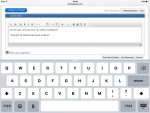
Here is a picture of mine for example with
an onscreen keyboard.

I do have a separate keyboard but rarely need to use it.


image.jpg
 
And after all this work, trying to figure it out, nervousness, I-hope-I-get-it-right I've been doing for the last week, today he says, "You know? It's you that wants me to get one. I don't want it. If someone stole it while I slept, Id feel too awful."

I cannot convince him that no one is stealing it because he's the only person there without one. So, okay. He doesn't want it, so I'm off the hook.
phew-smiley-emoticon.gif
 
They are fairly over rated anyways. A notebook is small but bigger than a ipad or ipod. I prefer it. To get a tablet that has some speed to it and memory as well,you need to fork out as much dough as you would for a notebook. Let me know if you want to know about notebooks now! lol