Your Phone

  • Thread starter Thread starter Abing
  • Start date Start date
  • Christian Chat is a moderated online Christian community allowing Christians around the world to fellowship with each other in real time chat via webcam, voice, and text, with the Christian Chat app. You can also start or participate in a Bible-based discussion here in the Christian Chat Forums, where members can also share with each other their own videos, pictures, or favorite Christian music.

    If you are a Christian and need encouragement and fellowship, we're here for you! If you are not a Christian but interested in knowing more about Jesus our Lord, you're also welcome! Want to know what the Bible says, and how you can apply it to your life? Join us!

    To make new Christian friends now around the world, click here to join Christian Chat.

Your phone OS


  • Total voters
    26
This says "laptop" but the same is true of smartphones.
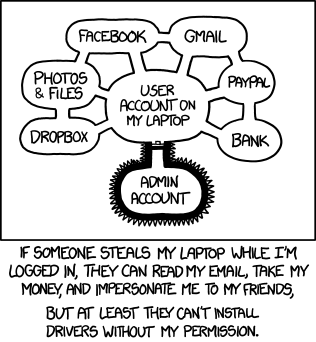
authorization.png


Before you say anything, I DO know better than to leave my phone lying around logged into all my accounts. I have set it so after a few minutes of inactivity it switches to my brother's accounts. :cool:
 
  1. Android, IOS, or Windows (and/or BB)? Android
  2. Most used apps: Facebook, Facebook Messenger, Flashlight, Spotify, Yahoo Mail, YouTube
  3. Other than calls and sms, what else do you use your phone for? Music, Social Media (Facebook/Facebook Messenger), Alarm clock, Map, Reading Kindle books and my Bible app, browsing the internet, CC, gaming (Angry Birds. Just Angry Birds), Reminders, Notes/lists, to see in the dark, emails. I very occasionally use the Camera.
  4. Can you last 24 hours without your phone? Yes, but it would be a little difficult at first. Most of the stuff I can do on my laptop. If I didn't have that, it would be more difficult. I'd just need a good book and my (ancient) mp3 player.
  5. Lastly, screenshot your home screen (if you want):
    I'm not sure how to screenshot my phone home screen. It's probably looks like your standard Android screen.
 
The background is from Ubuntu Linux, somewhere back in 2008 I think. A few weeks ago she-who-runs-media at church used it for a background, quite without knowing its origins. It seems they made a popular picture.

Coincidentally... it is called "Ubuntu chocolate." Might be why it's so popular.

I have Ubuntu on my laptop. Love it! Will not go back to windows. :D
 
  1. Lastly, screenshot your home screen (if you want):
    I'm not sure how to screenshot my phone home screen. It's probably looks like your standard Android screen.

If you press your power button and home at the same time, that should take a screen shot of your android. :D
 
If you press your power button and home at the same time, that should take a screen shot of your android. :D

Thanks. I don't know what I did. I tried that, but it just (forcibly) restarted my phone.
 
Thanks. I don't know what I did. I tried that, but it just (forcibly) restarted my phone.
Huh. Weird. Maybe the home button didn't register then. Sorry about that. Google, "screen shot android..." Then type in the make of your phone. :D
 
For Android 4.4 and above, hold down power and volume down at the same time. There will be a full-screen animation, looks like someone took a picture of it on its own screen or something, and you'll get a little notice about screenshot saved.

Order and timing are important. If you trigger volume down before power it will just turn the volume down. If you hold power too long before hitting volume down it will offer to turn off your phone. Hold power, then immediately hold volume down.
 
  1. Android, IOS, or Windows (and/or BB)? Windows - Miss my Android though.
  2. Most used apps: Bible, Facebook
  3. Other than calls and sms, what else do you use your phone for? Email, Alarm, Notes, Messages, Camera, Calculator, Browsing the Net, Maps, Candy Crush, Candy Crush Soda Saga, and Weather :)
  4. Can you last 24 hours without your phone? As long as my daughter is home and I don't need my Alarm - Yes. :D
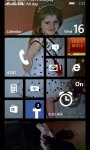
  5. Lastly, screenshot your home screen (if you want): The image is of my daughter when she was 3-years-old, on Halloween. She was an 80's prom queen. :D ...hehe

wp_ss_20151216_0001.jpg
 
Tell us about your phone and we'll tell you who you are :D. Yet another social thread for both singles and married ones. Phones are a big part of our lives and how we use them reveals a lot about our personalities :). Having started this thread, I'll start (and for statistics, I'll add a poll):


  1. Android, IOS, or Windows (and/or BB)?
  2. Most used apps:
  3. Other than calls and sms, what else do you use your phone for?
  4. Can you last 24 hours without your phone?
  5. Lastly, screenshot your home screen (if you want):


1. Android
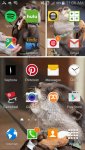
2. Spotify, Podcast Addict, Internet
3. navigation, streaming music or podcasts to my car speakers, as a tv remote control
4. Yes
5.
2015-12-16 11.07.57.jpg
 
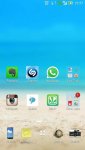
  1. Android, IOS, or Windows (and/or BB)? I have an ASUS Zenphone 2, which works on Android (Android v5.0, custom ZenUI)
  2. Most used apps: Chrome, YouTube, Whatsapp, Evernote, Google maps, Shazaam, Instagram, Calendar, Music PLayer, Gmail, Google Now and Skype
  3. Other than calls and sms, what else do you use your phone for? Lot of things - Social Media (Facebook & Instagram), CC, Google Chrome, Music (YouTube & Phone Media), Clicking pictures, Maps (I am directionally challenged!), Reminders, Alarm, To-do list, Managing my finances, Emails, Browsing the Internet, Generating Memes (I have an app for that, lol) and Skyping
  4. Can you last 24 hours without your phone? I would prefer not to go without using my phone. But, (and as most of the regulars may know), we recently went through a crisis when we did not have any power supply for almost 60+ hours. During that time, I was forced to switch off my phone for most of the day. That experience showed me how much the phone has become a part of my life.
  5. Lastly, screenshot your home screen (if you want): I have organized my screenshot into folders, so many of the apps are within the folders labelled 'Vital Tools' and 'Other Apps'. I like my homescreen being empty, or otherwise my OCD will kick in and that has never ended nicely.

P.S. You guys must try Shazam ... it's the coolest tool for any music lover, because if you are hearing a song and you don't know it's name, Shazam can identify the song for you!

Screenshot_2015-12-16-22-27-58.jpg
 
Last edited:
For Android 4.4 and above, hold down power and volume down at the same time. There will be a full-screen animation, looks like someone took a picture of it on its own screen or something, and you'll get a little notice about screenshot saved.

Order and timing are important. If you trigger volume down before power it will just turn the volume down. If you hold power too long before hitting volume down it will offer to turn off your phone. Hold power, then immediately hold volume down.

Cheers, Lynx. Now to find where the screenshot went and how to upload it.
 
It went to a folder labeled pictures. Why this happened I do not know. If you take pictures with your phone it goes to a folder labeled DCIM. But for screenshots alone Android makes a whole new folder labeled pictures. Nobody knows why, but that's where it will be.
 
Cheers, Lynx. Now to find where the screenshot went and how to upload it.

Or, you could find it on your Gallery in the folder "All pictures". That folder will show you ALL the pictures contained on your phone, no matter the app through which it was received or created.
 
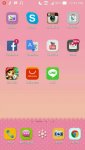
  1. Android, IOS, or Windows (and/or BB)? Android
  2. Most used apps: Chrome, Camera, Calculator
  3. Other than calls and sms, what else do you use your phone for? Bible, Social Media, YouTube, Games
  4. Can you last 24 hours without your phone? I can't.. I use it to communicate with my friends and customer (i have online shop)
  5. Lastly, screenshot your home screen (if you want):

12388249_10207164510326842_403015755_n.jpg
 
I have a Samsung Galaxy S5 which is an android. I love my phone and actually have only one small complaint about it, but I learned to accept it. I actually am still getting used to how a smartphone works rather than my old phone and have been known to accidentally send a text to the wrong person and one of my best friends sent me a text thinking she was sending it to her boyfriend. Lol

My most used apps are Gmail, Chrome, Google calendar, and my bible app. I also use my phone for emails and scheduling my week ahead of time with work, classes, and appointments. The one app I wasn't to sure about is the map, but it sure came in handy last week when I drove about an hour after work to meet a friend for lunch and got lost. I was a little scared when I heard this voice telling me where to turn in how many feet, I thought I was going crazy but it got me where I needed to go.

I can survive without my phone for 24 hours and have actually turned it off not to be bothered.

2015-12-17 12.16.32.jpg